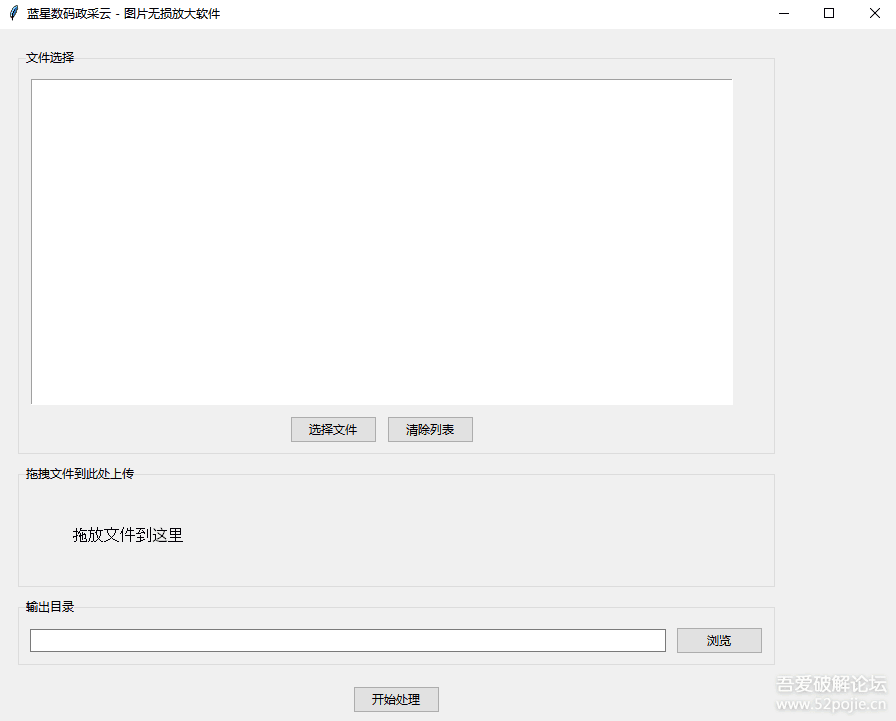
政采云上传图片大小要求最小为800*800,每次上传商品都是心酸的过程哈, 随便瞎写了一个,有需要自取,自己日常使用
——————————————————–
代码如下:
import tkinter as tk
from tkinter import ttk, filedialog, messagebox
from PIL import Image
import os
from tkinterdnd2 import DND_FILES, TkinterDnD
class ImageUpscalerApp:
def __init__(self, root):
self.root = root
self.root.title(“蓝星数码政采云 – 图片无损放大软件”)
# 设置一个足够大的初始窗口尺寸,比如 900×700
self.root.geometry(“900×700″)
self.file_paths = []
self.output_dir = tk.StringVar()
self.setup_ui()
def setup_ui(self):
main_frame = ttk.Frame(self.root, padding=”20″)
main_frame.grid(row=0, column=0, sticky=(tk.W, tk.E, tk.N, tk.S))
# 文件选择区域
file_frame = ttk.LabelFrame(main_frame, text=”文件选择”, padding=”10″)
file_frame.grid(row=0, column=0, columnspan=3, sticky=(tk.W, tk.E, tk.N, tk.S), pady=(0, 10))
self.file_listbox = tk.Listbox(file_frame, width=100, height=18)
self.file_listbox.grid(row=0, column=0, columnspan=3, sticky=(tk.W, tk.E, tk.N, tk.S))
button_frame = ttk.Frame(file_frame)
button_frame.grid(row=1, column=0, columnspan=3, pady=(10, 0))
ttk.Button(button_frame, text=”选择文件”, command=self.select_files).grid(row=0, column=0, padx=(0, 10))
ttk.Button(button_frame, text=”清除列表”, command=self.clear_files).grid(row=0, column=1)
# 拖拽上传区域
drop_frame = ttk.LabelFrame(main_frame, text=”拖拽文件到此处上传”, padding=”10″)
drop_frame.grid(row=1, column=0, columnspan=3, sticky=(tk.W, tk.E, tk.N, tk.S), pady=(0, 10))
self.drop_label = ttk.Label(drop_frame, text=”拖放文件到这里”, font=(“Arial”, 12))
self.drop_label.grid(row=0, column=0, padx=40, pady=30)
# 输出目录选择区域
output_frame = ttk.LabelFrame(main_frame, text=”输出目录”, padding=”10″)
output_frame.grid(row=2, column=0, columnspan=3, sticky=(tk.W, tk.E, tk.N, tk.S), pady=(0, 10))
ttk.Entry(output_frame, textvariable=self.output_dir, width=90).grid(row=0, column=0, padx=(0, 10))
ttk.Button(output_frame, text=”浏览”, command=self.select_output_dir).grid(row=0, column=1)
# 开始处理按钮
ttk.Button(main_frame, text=”开始处理”, command=self.process_images).grid(row=3, column=0, columnspan=3, pady=(10, 0))
self.root.drop_target_register(DND_FILES)
self.root.dnd_bind(‘<<Drop>>’, self.on_drop)
def select_files(self):
files = filedialog.askopenfilenames(
title=”选择图片文件”,
filetypes=[(“图片文件”, “*.jpg *.jpeg *.png *.bmp *.gif”)]
)
if files:
self.file_paths.extend(files)
self.update_file_list()
def clear_files(self):
self.file_paths.clear()
self.update_file_list()
def update_file_list(self):
self.file_listbox.delete(0, tk.END)
for file in self.file_paths:
self.file_listbox.insert(tk.END, os.path.basename(file))
def on_drop(self, event):
files = self.root.tk.splitlist(event.data)
image_files = [f for f in files if f.lower().endswith((‘.jpg’, ‘.jpeg’, ‘.png’, ‘.bmp’, ‘.gif’))]
if image_files:
self.file_paths.extend(image_files)
self.update_file_list()
def select_output_dir(self):
dir_path = filedialog.askdirectory(title=”选择输出目录”)
if dir_path:
self.output_dir.set(dir_path)
def process_images(self):
if not self.file_paths:
messagebox.showerror(“错误”, “请先选择图片文件”)
return
output_dir = self.output_dir.get()
if not output_dir:
messagebox.showerror(“错误”, “请选择输出目录”)
return
try:
for file_path in self.file_paths:
self.upscale_image(file_path, output_dir)
messagebox.showinfo(“成功”, “所有图片处理完成!”)
except Exception as e:
messagebox.showerror(“错误”, f”处理图片时出错:{str(e)}”)
def upscale_image(self, input_path, output_dir):
with Image.open(input_path) as img:
original_width, original_height = img.size
target_width = max(800, original_width)
target_height = max(800, original_height)
if original_width < target_width or original_height < target_height:
img = img.resize((target_width, target_height), Image.LANCZOS)
output_path = os.path.join(output_dir, os.path.basename(input_path))
img.save(output_path, quality=95)
def main():
root = TkinterDnD.Tk()
app = ImageUpscalerApp(root)
root.mainloop()
if __name__ == “__main__”:
main()
——————————
通过网盘分享的文件:图片无损放大工具.rar
链接: https://pan.baidu.com/s/1UvrYRYNlXqxjuvbd-5Rs7g?pwd=zb93 提取码: zb93
成品上面的连接, 打开的效果如图