介绍
官方网站:http://www.squirrelsql.org/
可以通过多种方式来检查数据库环境,特别是考虑到最近在有关 DBMS 的数字环境中的进步。 除了实际的数据库管理系统,用户还可以求助于数据库可视化工具,虽然缺乏更高级的功能,但通过简单性带来的效率弥补了这一点。 也许没有那么简单,但 SQuirrel SQL Client 旨在为那些可视化 JDBC 兼容数据库的人提供一种方便的方式。
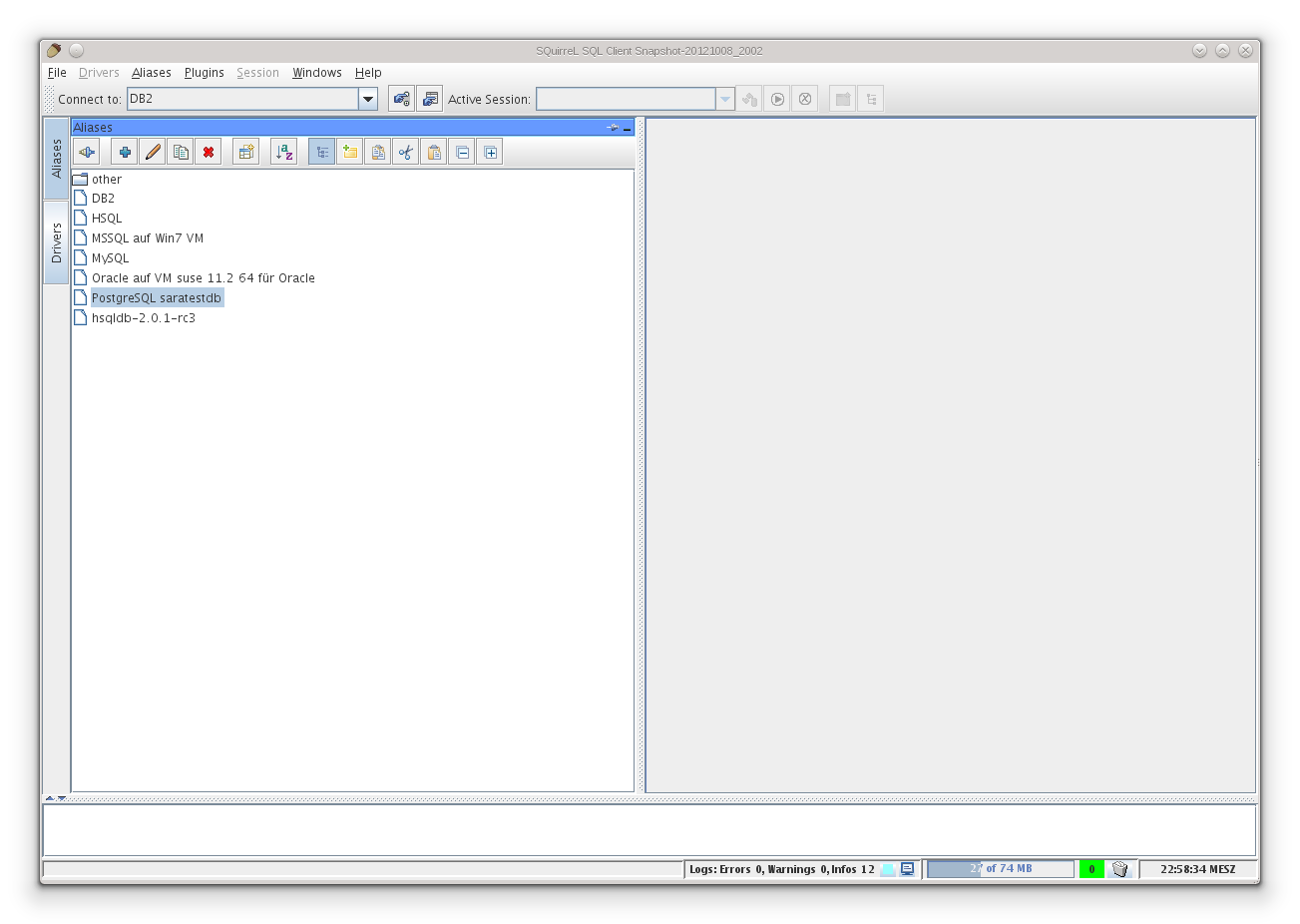
软件截图

软件特点
对象树视图允许浏览不同的数据库对象,如目录、表、触发器和多个其他对象。
SQL 编辑器可以打开、创建、保存和执行包含 SQL 语句的文件,并提供语法高亮显示。
SQuirreL 还支持使用不同数据库的多个会话。 这使得比较数据和在数据库之间共享各种 SQL 语句变得更加容易。
SQuirreL 可以在任何安装了 Java 虚拟机的系统上运行。
插件框架允许特定于供应商的数据库扩展。
用户界面存在多种翻译。
SQuirreL 可以生成图表和图形,显示表格和其他功能之间的关系。
SQuirreL 书签 – SQuirreL 带有用户定义的模板以及用于许多最常见的 DDL 和 SQL 语句的预定义示例书签。
更新日志
SQuirrel SQL Client 4.8.0
Sep 2, 2024
Enhancements:
Hibernate Plugin: Generating SQL from HQL now uses the SQL-Extractor of the hypersistence-utils library,
see https://github.com/vladmihalcea/hypersistence-utils.
To generate SQL from HQL execute a HQL and use the SQL button on the upper right of the HQL result tab.
To use this feature the hypersistence-utils library must included in the Hibernate Plugin’s configuration.
https://github.com/squirrel-sql-client/squirrel-sql-code/issues/34
SQL result table:
– Option to display cell details on the left of the table, see new toggle button with flip chart icon.
– Option to view contents of cell detail or cell data popup as image.
Additional SQL tabs can be renamed.
See SQuirreL’s main toolbar –> Button switchable between “New SQL Worksheet” and “New SQL Tab”.
The tab names are stored with Saved Sessions and Saved Session groups.
Updated the JDBC driver websites of several predefined drivers,
see Drivers panel –> right mouse menu “Show Driver Website”.
Thanks to zcattacz for the pull request.
Added description for single character and multiple character SQL statement separators.
See menu Files –> New Session Properties –> tab SQL –> lower part of panel.
Introduced Java 22 compatibility.
SQL result: The rows and columns display now offers several copy functions.
Dialog to rename Session tabs is now resizable, see right mouse menu of Session tabs.
Saved Session groups: New toolbar and Session menu “Save/manage group of saved Session” allows to save
multiple Sessions and their SQL editors.
– To reopen a group use the “Open Saved Session or groups” toolbar button or Session menu.
– Note: The “Save/manage group of saved Session” dialog offers an optimization
which allows to save all open Sessions by using the ctrl+alt+shift+m shortcut to open the dialog
and then hitting enter to save or GIT commit.
SQL editor’s right mouse menu offers to execute SQLs.
Bug fixes:
SQL result: Resize mouse cursor didn’t show between column headers
Side effect of implementation of https://github.com/squirrel-sql-client/squirrel-sql-code/issues/34
Code completion: When a completion entry was selected by mouse click to SQL editor lost focus.
SQL result: Display of current row and column, selection count and summing didn’t work after tables was made editable.
SQL result: Fixed tooltips of mark duplicates buttons and menu items.
File import: Fixed NullPointer when file import was started.
File import: If Ok was clicked immediately after a fixed value was edited the edited value wasn’t used.
File import: Avoided non cancelable progress dialog.
File import: Fixed values were not written to the database when a column was of numeric type.
SQL result search function: Moving search results to an own table window didn’t work when the result table was sorted.
Copying from table cell data popup was not added to paste history (ctrl+shift+v or ctrl+shift+insert).
Tools popup (ctrl+t) was broken by too long description.
Saved Session groups, several bug fixes:
When group members were moved to a standalone Saved Session their internally saved SQL files were lost.
When group members were moved to a standalone Saved Session SQuirreL’s title bar wasn’t updated.
When group members were moved to a standalone Saved Session a wrong Saved Session exist warning was shown.
Extended several tool tips concerning Saved Sessions and groups.
#1528 When users changed a Session tab’s name and switched to another catalog the changes were lost.
Look and feel plugin: When SQuirreL was installed into an empty directory
loading the FlatLaf Look and Feel raised a ClassNotFoundException. In consequence SQuirreL’s dark theme did not work.
Additionally FlatLaf was upgraded to version 3.4.1.
Saved Sessions and groups: The “Open / manage …” dialog’s list did not repaint when a Session or group was renamed.
Saved Session groups: Deleting Sessions from groups did not work.
It now works the same way as when a Saved Session of an open Session is deleted. I.e. all internal files are detached.
Editable cell data popup: When updating data fails with a “No rows updated” message box
the message box was poorly positioned.
When new users with fresh installations close SQuirreL with an open Session
they are shown the Session-close confirmation message box.
If then they check the confirmation message box to be not shown again
and close the message box by the No-button, SQuirreL lost their “not shown again” choice.